
Your Architecture Has No Memory
Published: October 30, 2026
Wednesday morning, stand-up. It's Anna's third day as a backend developer on a ticketing platform.
She's done her homework. On day one she found the architecture diagram. On day two she read through the code. And somewhere along the way she noticed something: seat reservations get slow during the big on-sales. Painfully slow. The fix looks obvious.
So when her turn comes, she says it. "Why don't we keep seat holds in Redis, with a short expiry? It would be much faster."
And then... the room goes quiet.
Someone suddenly finds their coffee very interesting. Someone else glances at Péter, the last person on the team who was there when it happened.
Because two years earlier, the team had done exactly that. And it worked. For more than a year, it worked beautifully. Right up until the biggest on-sale of the season, when Redis failed over in the middle of the rush. A batch of reservations simply vanished, and a few hundred seats were sold twice. To real people, who then showed up at the gate holding tickets for the same seat.
What followed was a week of refunds, apologies and very long evenings. After that, the reservations quietly went back into the database.
Anna didn't know any of this. How could she? The diagram she'd studied was correct. It showed the system exactly as it is today, and there was no Redis on it. What it couldn't show was that Redis used to be there, and why it had to go. Of the two people who remembered the whole story, one had left in the spring.
So the team spent the next forty minutes arguing about a decision it had already made, paid for, and reversed.
That isn't Anna's fault. The system simply has no memory.
The diagram was right. It just had no history.
Here's the strange part: the team wasn't short of documentation. They had a diagram, and it was even current, which is rarer than it should be. What they were missing was the other half.
Anyone who uses Git every day knows this split. A checkout gives you a snapshot: the files as they are right now. That's enough to run the code, but not to understand it. For that you need the history, the commits that say what changed and, if someone wrote a decent message, why.
Architecture works the same way. A C4 diagram is the snapshot: what the system looks like today. Architecture decision records (ADRs) are the diffs: each one says what changed in the architecture and why the team chose it over the alternatives.
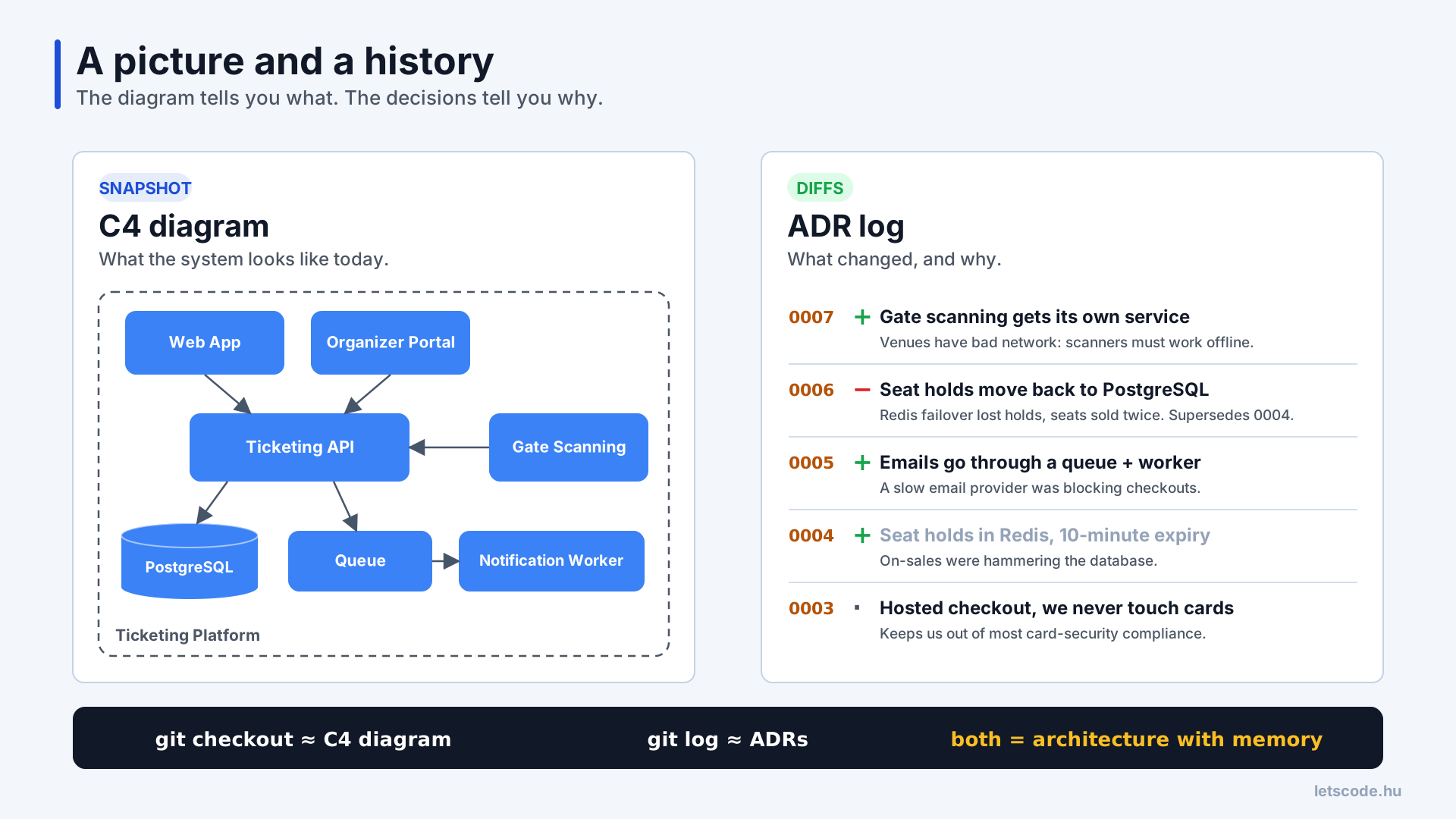
The snapshot shows what; the diffs explain why.
You need both. A snapshot without history tells you what, never why. That's exactly where Anna was on day three: looking at a perfectly accurate picture that had no way to warn her. History without a snapshot is just as useless, though. Nobody reads forty ADRs in a row and replays them in their head to work out what the system looks like now.
The snapshot: two C4 diagrams are usually enough
I've written about drawing diagrams people can actually read, so here is the short version. C4, created by Simon Brown, gives you four zoom levels: System Context, Container, Component and Code. For the snapshot role, the first two do most of the work.
The System Context diagram shows your system as one box, the people who use it, and the outside systems it depends on. On Anna's platform that's customers and organizers, the ticketing platform itself, a payment provider, an email provider and the scanners at the venue gates.
The Container diagram zooms into that box and shows what runs separately or stores data: the customer web app, the organizer portal, the main API (a modular monolith), PostgreSQL, a queue with a notification worker, and a separate gate-scanning service with its own small database. A container in C4 is not a Docker container; it's anything that runs or stores data on its own.
Component diagrams are worth drawing only where people actually get lost, and code diagrams are better left to the IDE. Every extra level is one more thing that goes stale.
The diff: what an ADR records
So what would have saved those forty minutes? A short document about one architecture decision. That's all an ADR is. Most templates go back to Michael Nygard's 2011 post, and the important word is short: one or two pages. The shape I use:
- Title: what we decided, not what we discussed. "Keep seat holds in PostgreSQL", not "Database discussion".
- Status: Proposed, Accepted, Rejected, or Superseded by a later ADR.
- Context: the situation and the forces pulling on it right now.
- Options considered: at least two real ones. "Do nothing" counts.
- Decision: one or two sentences.
- Consequences: the good ones, and the bad ones we accept on purpose. Future readers need this part most, and teams skip it most often.
- Changes containers: which boxes on the diagram this adds, removes or changes.
- Revisit when: a concrete trigger to look at it again, such as a team size, a traffic number or a date.
The last two aren't in Nygard's original, but they're the ones that tie the decision to the snapshot and keep it from silently going stale.
One rule makes ADRs behave like commits: once accepted, you don't edit them. When the team changes its mind, it writes a new ADR that replaces the old one, and the old one gets a single update, its status becomes "Superseded by". Nobody rewrites published commits on main either. You add a new commit that reverts the old one, and the history stays honest.
Here's the record Anna never got to read. The decision from that painful March, shortened:
# ADR-0006: Keep seat holds in PostgreSQL

Status: Accepted (2026-03-24) · Supersedes ADR-0004

## Context
During the March on-sale the Redis primary failed over. Holds written in the last
seconds never reached the replica; ~300 seats were released and sold twice.
Seat holds are part of order correctness, not a cache.

## Options considered
1. Harden Redis (stricter persistence, sync replication): fast, but two sources of truth
2. Holds in PostgreSQL: expires_at column, row locks with SKIP LOCKED, a sweeper job
3. Do nothing: accept rare double sales, refund by hand

## Decision
Option 2. One source of truth for seat state.

## Consequences
+ No lost holds on failover; hold and order commit in one transaction
+ One less system to run
- More write load on PostgreSQL at peaks (load-tested to 3× the March peak)
- The sweeper job is a new moving part that needs an alert

## Changes containers
Ticketing API, Main DB · removes Seat Hold Cache (Redis)

## Revisit when
On-sale peak above 3× the March 2026 peak, or p95 hold time above 300 ms
Look at that context section for a second. Three sentences, and the whole week of refunds is in there. That's the story Péter had to tell from memory.
A caveat from an earlier post still applies: an ADR written after the fact, just to have a document, is a receipt. The value comes from writing it before the decision, because that forces the conversation. Everything below assumes the team does that.
Reading the history like a commit log
Put the two together, and the platform's architecture reads like a short commit log. Every line is a small story of its own:
- ADR-0001: start as a modular monolith. Three developers, no reason to pay for microservices yet. Revisit when more than three teams work in the codebase.
- ADR-0002: PostgreSQL is the only main data store.
- ADR-0003: customers pay on the payment provider's hosted page, so we never touch card data and stay out of most card-security compliance work.
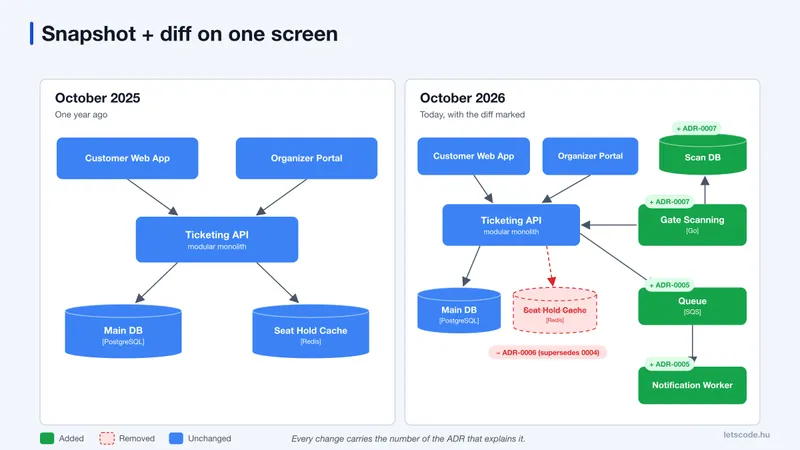
- ADR-0004: seat holds go into Redis with a ten-minute expiry, because on-sales were hammering the database. A new box appears.
- ADR-0005: emails go through a queue and a worker, after a slow email provider kept checkouts waiting. Two more boxes.
- ADR-0006: seat holds move back to PostgreSQL. Supersedes ADR-0004, and the Redis box disappears.
- ADR-0007: gate scanning gets its own service, because venues have poor network and scanners need to work offline and sync later.
See ADR-0004 and ADR-0006? That's Anna's idea, and its ending, in two lines.
The most useful picture comes from laying last year's container diagram next to today's and marking each change with the ADR that caused it:
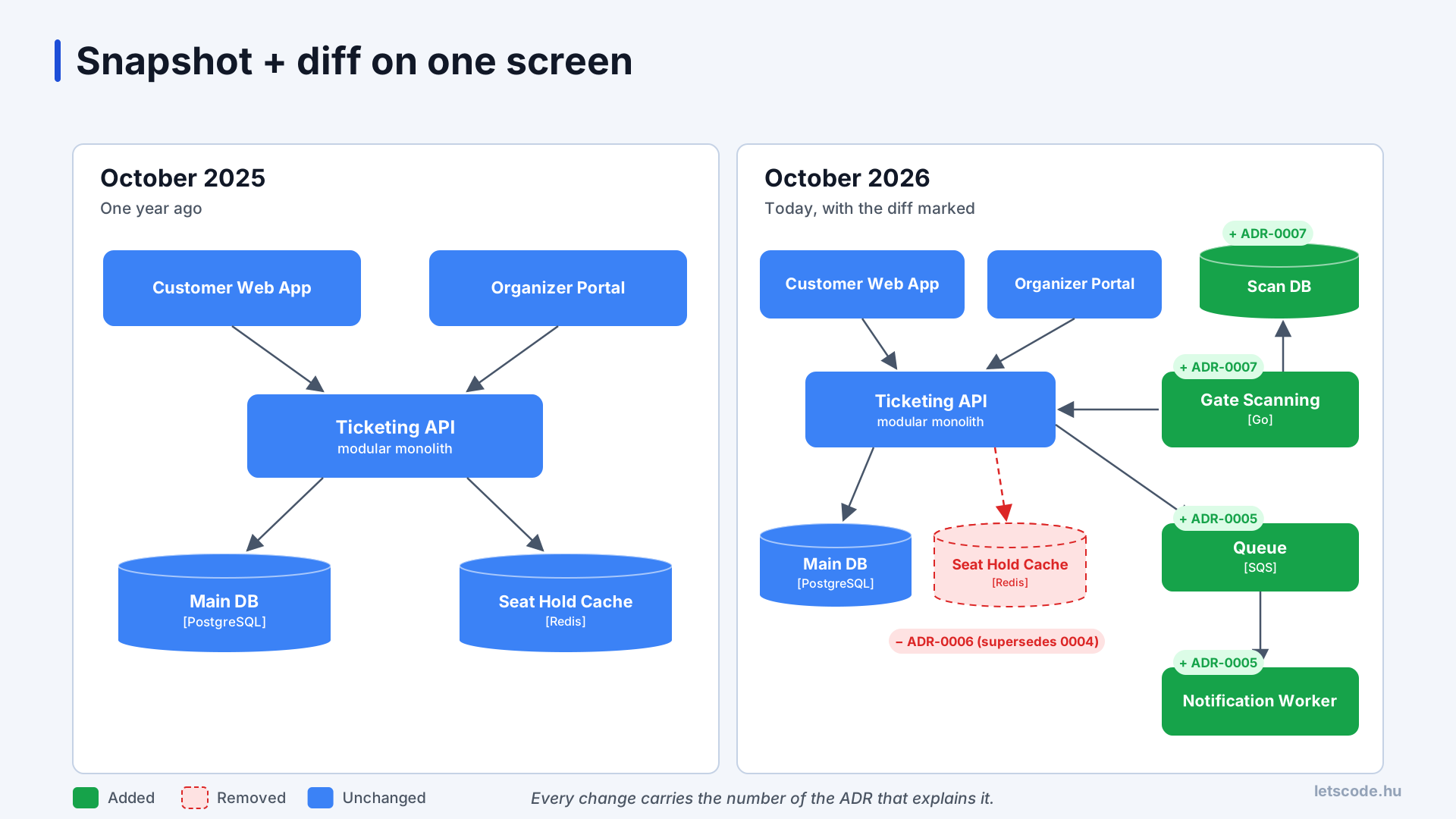
Green was added, red was removed, and every change carries an ADR number.
Now let's rewind that stand-up. Same Wednesday, same idea, but this time the log exists.
Anna says "Redis". Nobody stares into their coffee. Péter just says: "Good instinct. Have a look at ADR-0006 first, we tried that once."
Two minutes later she knows why Redis was dropped. Maybe she still thinks Redis is the right answer, and that's fine. But now her proposal has to deal with the failover problem, and the conversation starts from where the team already is, not from zero.
Forty minutes became two. And nobody had to relive the worst week of their year.
Wiring the two halves together
There's a catch, though. None of this works if the diagram lives in one tool, the ADRs in another, and nothing points between them. Three small habits fix that.
Keep both in the repository. A docs/architecture/ folder with the diagram as text (Structurizr, Mermaid or PlantUML) and a decisions/ folder with one numbered Markdown file per ADR. They get reviewed in pull requests and show up in the same search as the code, which is more than most wikis manage.
Link in both directions. Every ADR lists the containers it changes, and every container lists the ADRs behind it. In Structurizr DSL this is a property on the element:
api = container "Ticketing API" "Modular monolith" "Kotlin, Spring Boot" {
    properties {
        "adrs" "0001, 0003, 0006"
    }
}
From any box you can now ask "why is this here?" and get an answer in one click. It's essentially git blame for the architecture.
Change them in the same pull request. If an accepted decision adds, removes or rewires a box, the diagram update goes into the same PR as the ADR. Not later, and not in a separate ticket. With a text-based diagram, the reviewer sees the diff of the picture right next to the decision that caused it. This rule keeps the snapshot honest better than any quarterly documentation sprint.
Onboarding: snapshot first, then the diffs that matter
Let's give Anna the first week she deserved. With both halves in place, I'd onboard her in four steps:
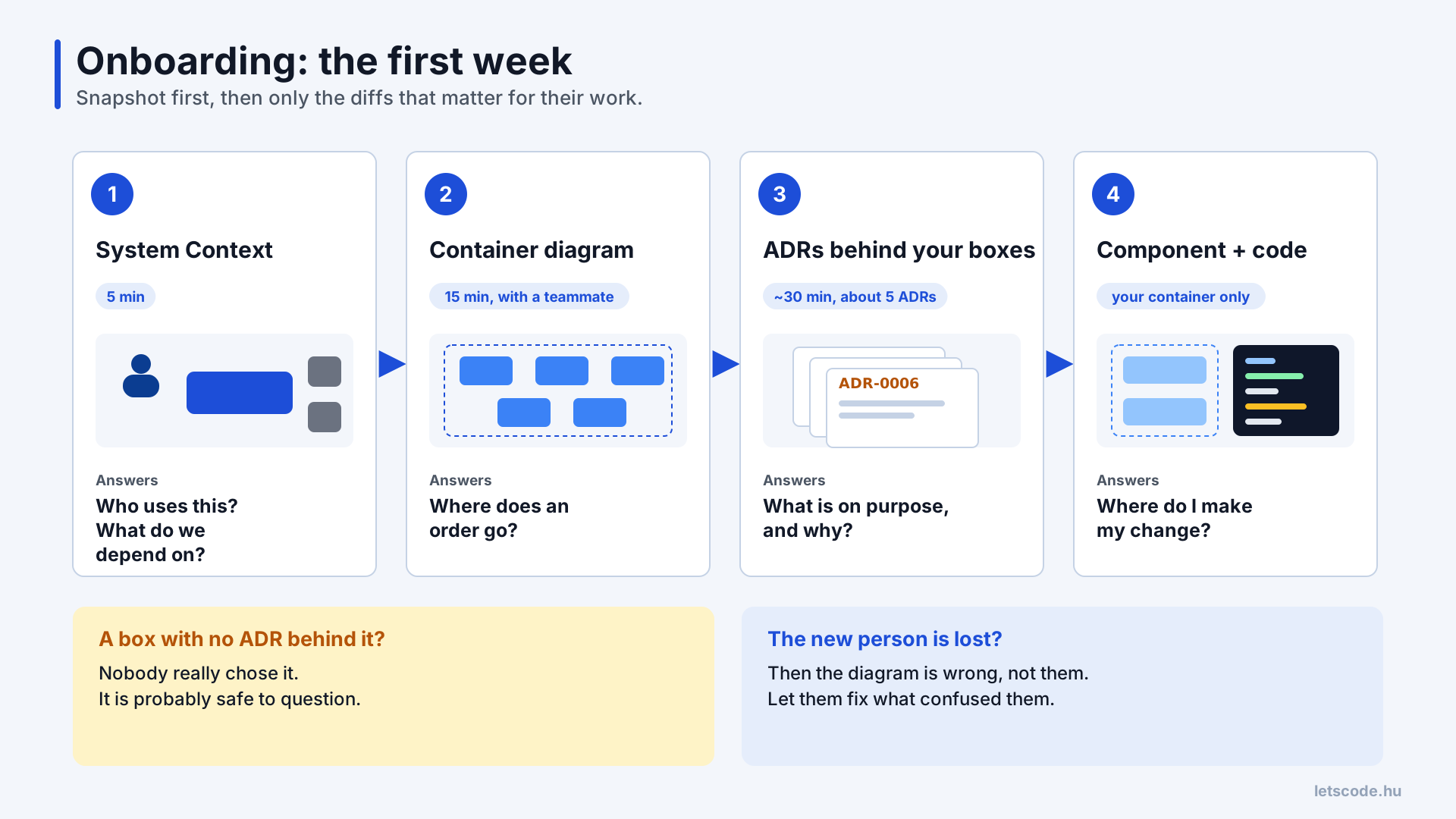
The snapshot first, then only the diffs that matter for their work.
The System Context takes five minutes. The Container diagram takes fifteen, ideally with a teammate walking her through it: an order comes in here, the seat is held here, the email goes out through there. Then come the ADRs behind the boxes she'll actually touch. Anna is joining the checkout work, so she reads the decisions on seat holds and payments, maybe five documents and half an hour. Only after that comes the component view of her own container, and the code.
Compare that with the usual "here's the repo, here's the wiki, ask if you have questions." Oh, the questions do come. One by one, for months, and each answer depends on who happens to remember. With the snapshot, a newcomer knows where things are within the first hour. With the diffs, they know what's deliberate, what's a scar from an incident, and what nobody really chose.
That last category is useful too. If a box on the diagram has no ADR behind it, it probably grew there without a decision, and it's fair game to question.
There's a bonus as well: new people are excellent reviewers of your documentation. If they can't follow the diagram, the diagram is wrong, and the cheapest documentation update you'll ever get is letting them fix whatever confused them.
Deciding: writing the next diff
Fast forward a year. Anna isn't new anymore.
The company has grown to four teams, and the payments team wants payments to become a separate service, because they keep stepping on each other's toes in the monolith. The meeting is booked. Everyone expects a long one.
The same structure helps here too, only in the other direction: this time the team isn't reading the history, it's adding to it. I'd run it as a loop:
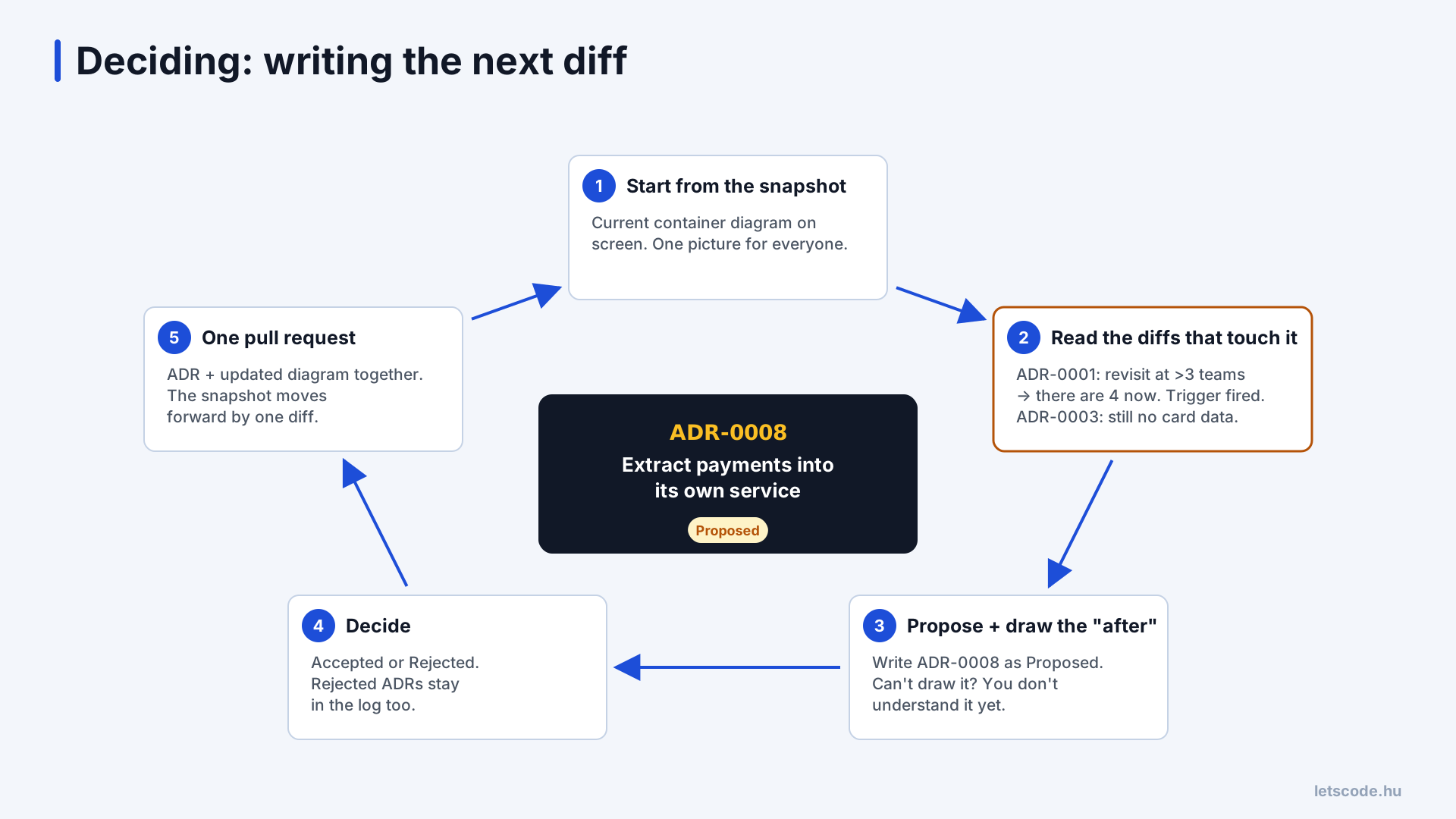
Every accepted decision moves the snapshot forward by one diff.
Start from the snapshot. Put the current container diagram in front of everyone. A surprising number of architecture arguments are really two people with two different pictures in their heads.
Read the diffs that touch the area. This time it's Anna who opens ADR-0001. It said to revisit the monolith once more than three teams work in the codebase. There are four now, so the trigger has fired. And just like that, the tone of the meeting changes: nobody is arguing against the previous architect, because the earlier decision itself asked to be reopened. ADR-0003 is relevant too. Whatever the new service does, it must not pull the company back into handling card data, and that constraint is better known before the design than after.
Write the new ADR as Proposed, and draw the "after" picture. What does the container diagram look like if this is accepted? A new payments service, maybe its own database, new arrows with labels. Drawing it is a good test of the proposal. If the team can't draw it, it doesn't understand the proposal yet. If the picture suddenly has eleven new arrows, that's a conversation worth having now.
Decide. Accepted or Rejected, and a rejected ADR stays in the log too. Next year, when someone has the same idea, they'll find it along with the reasons.
Merge the ADR and the updated diagram together. The snapshot moves forward by one diff, and the loop starts again from there.
The meeting that everyone expected to be long? It ends early.
Where this usually breaks
I'd love to say every team that tries this lives happily ever after. It doesn't. I've seen each of these more than once:
- ADRs for everything. The logging library and the date format don't need a decision record. Keep ADRs for choices that are expensive to reverse: data stores, boundaries, integration patterns, security and money. Otherwise the important ones drown.
- Diagrams at every level. Teams get excited about C4, draw component diagrams for every container, and six months later all of them are wrong. Maintain context and container; add components only where people get lost.
- ADRs written after the fact. A few retrospective ADRs are a good way to practice when a team starts. If every ADR is written after the Slack thread already decided, the team has a history but no better decisions.
- Editing old ADRs. Someone "fixes" ADR-0004 to match what the system does now, and the history is gone. Just like that, Anna's Redis idea has no ending again. Supersede, don't edit.
- Nobody owns it. The diagram drifts, and after a year nobody trusts it. The same-PR rule fixes most of this; a fifteen-minute look at the diagram with the team once a quarter catches the rest.
Starting from zero
If none of this exists in your team yet, the first version is small. Draw the System Context and Container diagrams of the system as it is, not as you'd like it to be, and put them in the repository as text. Pick the three decisions newcomers ask about most, the ones that always come up as "wait, why do we do it like this?", and write a short ADR for each, linked to the boxes they explain. Agree that a decision that changes the diagram changes it in the same pull request. And for the next decision that's hard to undo, write the ADR before the meeting.
That's a couple of days of work.
And somewhere out there is your next Anna. She'll find the diagram on day one, read the code on day two, and on day three she'll come to stand-up with an idea. Maybe the room goes quiet again.
But this time, it's because everyone is reading.
If you need help with this
If new people in your team take months to find their way around, or the same architecture decisions keep coming back every few sprints, this is exactly what I help teams with. In practical architecture workshops we start from your own system, draw the snapshot together and write the first ADRs for the decisions that matter.
If you'd rather get help with a specific problem, in a consulting engagement I review your current architecture and documentation, and we work out together how to make the next decisions easier to make and easier to understand later.
