

Your Architecture Diagram Makes No Sense
Published: October 19, 2026
Put a construction blueprint in front of a developer and chances are they won't understand a thing. That's fine, really: the symbols, abbreviations and annotations aren't meant for them. The builder the blueprint is written for can tell at a glance what the wall is made of, where the bathroom goes and where the water lines run. The construction industry has had decades to settle on its conventions.
Software gets plans too, and they are drawn the same way: by professionals, for professionals. Yet we rarely use a shared notation, so the reader often stands in front of a diagram the way we just stood in front of that blueprint. It's even worse when they understand part of it and fill in the rest from imagination. Those assumptions often do more damage than simply tracking down the author and clearing up the blind spots together.
Why does everything turn into one big diagram?
A building gets built to plan, and then it's rarely extended with a few extra floors or a wind turbine on the roof. Software lives on being changeable; the word soft is in its name for a reason. But whatever keeps changing leaves its drawings behind sooner or later.
That's true of all documentation, and it makes a lot of people's jobs miserable, because documentation has to be kept current. With diagrams it hurts most. The tools are sophisticated and companies pay serious money for them, yet updating a diagram is still manual labor. A new component shows up, and every arrow leading to it has to be redrawn, even though the layout was nicely arranged until then. Afterwards it looks like a Word document where someone carelessly pasted in a picture.
On top of that, we know our IDE shortcuts by heart, but not how arrows work in Lucidchart or Excalidraw. So even a tiny change can eat hours while we fumble with the tool.
And whatever takes that much effort, we try to minimize in the most obvious way: we draw fewer diagrams. That's how the one big diagram is born, the one we show the CTO, pull up for the new developer's onboarding, send to the security audit, and the one the infra team wraps in subnets. It looks like we're saving a lot of work, but the value is much smaller. Generating diagrams from code doesn't solve this on its own either: ten diagrams means ten source files to maintain, which pulls you back toward the one big shared diagram.
And then we wonder why nobody gets it
A few mistakes show up again and again. None of them is complicated, yet together they are enough to leave you with more questions after looking at the diagram than before.
Every box looks the same. One is a service, another is a team, a third is a server, and all three are the same rectangle. The reader is left guessing what they're looking at.
The arrows say nothing. There's an arrow between two boxes. Is that an HTTP call? An event? A data flow? Or does it just mean the two things are somehow related? Without a label, it stays a guessing game.
Zoom levels get mixed. The whole company landscape sits in one corner and a specific class in another. The reader keeps switching perspective, and after a while would rather ask a colleague what the diagram was trying to say.
It speaks to everyone at once. The CTO, the developers, ops, the security team and the newcomers all ask completely different questions. A single diagram rarely answers all of them well, so it usually ends up useful to nobody.
It's outdated and nobody knows. A year and a half ago it was current. Since then services have been merged, rewritten and replaced, and the diagram never followed. Whoever stumbles on it in a forgotten corner of Confluence will probably treat it as if it were still true.
Here is all of that together, on a made-up webshop:
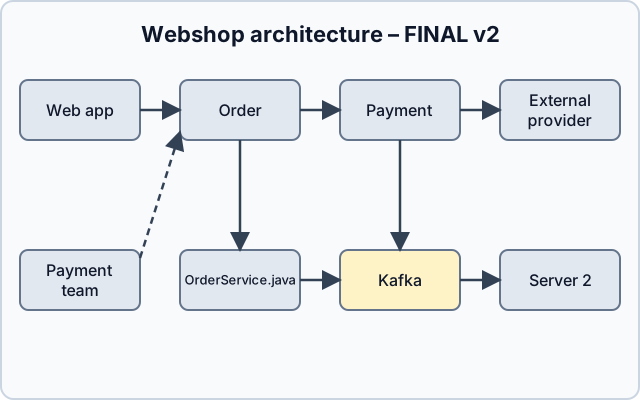
Bad example · architecture of a made-up webshop
Eight identical boxes, including a team, a server, a Java class and an external provider. The arrows have no labels, and nothing explains the dashed line or the highlighted Kafka box. The title tells you this is the final, second version, but nobody knows when it was made.
Start with the question and the audience
The first thing I'd do is not open any diagramming tool. There are two questions to answer: what do we want to show, and to whom.
The "what" might be how a payment travels through our system, or which external systems we depend on. Those are two different questions, and the best part is that nobody and nothing forces us to cram them into the same diagram.
The audience matters just as much. The diagram for a new developer is different from the one we put in front of the CTO, and that's fine. If two audiences need two diagrams, draw two. Yes, that doubles the documentation, but in return there's a chance somebody will actually use it.
Zoom levels: the C4 model
The closest thing our profession has to the architects' conventions is probably the C4 model. Simon Brown created it, and the idea is simple: you describe a software system on four zoom levels, the way you zoom on a map from the continent down to the street. Each level answers a different question, and a diagram stays on one level.
1. Context. The outermost view. Our system is a single box, surrounded by the users and external systems it talks to. There are no technology details, so anyone from the CTO to the business side can read it.
2. Container. We zoom into the system and show the runnable, deployable units: web application, mobile app, backend service, database, message broker. This is where technology appears (Spring Boot, PostgreSQL, Kafka, for example) and how the units talk to each other. A common misunderstanding is that "container" here means a Docker container. In C4 it's anything that runs on its own or stores data.
3. Component. We break a single container into its main building blocks: modules, controllers, service layers. This one is for the development team, and it's worth drawing when the container is complex enough to need an explanation.
4. Code. Classes, interfaces, tables. C4 itself suggests rarely drawing this level by hand, because your IDE or a generator will show it more up to date.
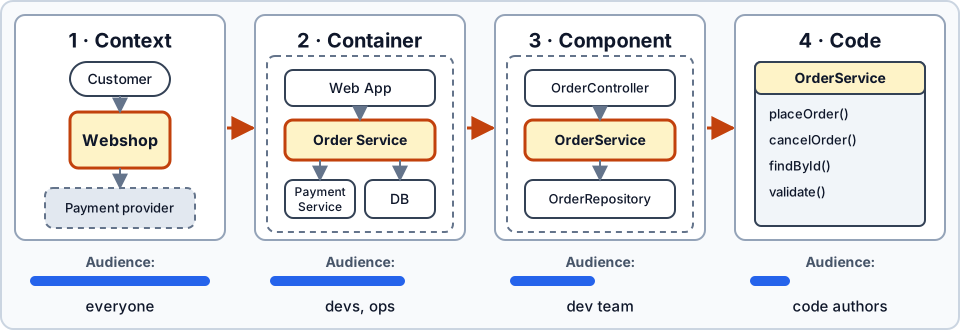
The four levels of the C4 model · zooming in from left to right
Each step zooms into one box of the previous level, and the closer we get to the code, the narrower the audience becomes.
Besides the four main levels, C4 has a few supplementary views. The system landscape shows how multiple systems relate within an organization. The dynamic diagram follows the steps of one specific flow, such as the path of a payment. The deployment diagram shows what infrastructure the containers run on. So the infra team's subnets belong there; on a Container diagram they'd only be noise.
A practical map of who needs which view:
| Audience | What do they want to know? | C4 view |
|---|---|---|
| CTO, business side | Which systems do we work with, who do we depend on? | Context |
| New developer | Which services exist, how do they talk to each other? | Container |
| Development team | How is this service built internally? | Component |
| Ops, infra | Where and on what does all of this run? | Deployment |
| Security audit | Where does data cross system boundaries? | Context and Container, with data flows |
| Product team, support | What happens during one specific flow? | Dynamic |
For most teams, the Context and Container levels deliver the most value. The Component diagram helps for the more complex services, and the Code level can happily stay in the code.
One more thing: C4 doesn't prescribe a mandatory notation. It works with boxes and arrows, but expects every element to have a name, a type, a technology and a short description, every relationship a label, and every diagram a title and a legend.
Bad diagrams are typically missing exactly these.
Labels, legend, date
I have a surprisingly simple rule for arrows: write on them what happens. If one service calls another over HTTP, put that on the arrow. If it publishes an event to Kafka, put that. An unlabeled arrow can mean anything, but a well-labeled one tells a piece of the system's story.
The same goes for colors and line styles. If something carries a special meaning, give it a legend. You don't have to write a full standard; a few lines are enough so the next reader doesn't have to guess what the dashed line means.
The title and the date help a lot too, especially when someone finds the diagram months later and has to decide whether they can still rely on it.
The same webshop, redrawn with these rules:
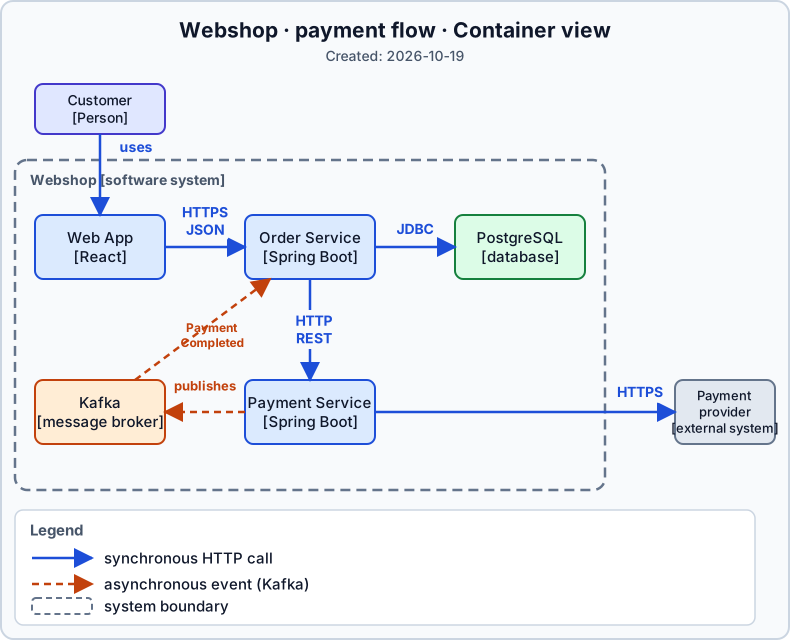
Better example · the same webshop, Container view
The diagram answers a single question (how a payment travels through the system) and stays on the Container level throughout. Every element has a name and a technology, the arrows show what's a synchronous call and what's an event, and the system boundary and legend keep the reader oriented. The Payment team, Server 2 and OrderService.java are gone: they belong on an org chart, in a deployment view and on a Component diagram, respectively.
Diagram as code: closer to the code
What helps most against staleness is keeping the diagram where the code lives. Mermaid, PlantUML and Structurizr generate images from a text description, so the diagram can go into Git, and you can review its changes in a pull request just like code.
Structurizr deserves a special mention because it's built specifically for C4. You describe the system once as a model, and it generates the different views from it. That puts a single source behind ten diagrams, which fixes the trap from the intro: you can maintain several audience-specific diagrams without pushing the same change through ten of them.
When the system changes, updating the diagram can be part of the same piece of work. No separate graphics editor, no hunting for boxes, no repairing arrows that drifted apart.
It has its limits too, of course. Automatic layout is often ugly on larger diagrams, and it's hard to get it to put side by side what you want side by side. It doesn't guarantee freshness either: if nobody updates the source, the generated image goes stale too. But maintenance hurts less, and it fits into the development process more easily.
Also, let's not overcorrect. Generating every tiny detail from code is overkill, and not every conceivable viewpoint needs its own diagram. The goal is a usable diagram; nobody is missing one more administrative burden.
Where does AI help?
Diagram as code has a side effect that has become especially valuable lately: a language model can read and write the text source too. A few practical uses:
- A first draft from the codebase. A coding agent reads through the repository and produces the Mermaid or Structurizr source of a Container-level diagram. It's rarely perfect, but as a starting point it's much faster than a blank canvas.
- Drift detection in pull requests. If a PR introduces a new service, queue or external call, an AI review can flag that the diagram source didn't change with it.
- Audience-specific views. From the same model you can ask for a simplified Context view for management and a more detailed Container view for the team.
- A map for the agent. A well-structured, labeled architecture description helps the model find its way around the system too. The same source the new colleague learns from can go into a coding agent's context.
One warning belongs here, though. AI will confidently draw relationships that don't exist, and sometimes leaves out one that's critical. A generated diagram needs review just like generated code. And deciding the question and the audience is still on us.
Before you share your next diagram
You don't need any special methodology, just a few questions to ask yourself:
- Is it clear what question the diagram answers?
- Do we know who it was made for?
- Does the level of detail stay on a single C4 level?
- Do the arrows show what happens?
- Is there a legend if colors or line styles carry meaning?
- Does it have a title and a date?
- Does its source live where the code lives?
If the answer to all of these is yes, the diagram will probably help someone understand something.
That's what this is really about. A good architecture diagram is one the right person looks at and understands what it was made for. How many components fit on it, or how long we spent aligning the boxes pixel-perfect, is beside the point.
If you need help with this
If your diagrams regularly raise more questions than they answer, this is exactly what I help teams with. I run practical architecture workshops where we start from your own systems, clear up the important decisions together, and produce diagrams that stay useful after the workshop.
If you'd rather get help with a specific problem, in a consulting engagement I review your current architecture and documentation, help you find the gaps, and we think through together how to make better design decisions.
